
About FAVI Extra
FAVI Extra is a simple solution that will help you collect user reviews on the products you sell and the overall quality of your e-shop. By introducing this new service, you will also support the position of your products in the FAVI catalog.
The main goal of this feature is to enrich the customer's experience when buying furniture and decorations online. At the same time, we believe that the shared experience in the form of reviews will not only inspire potential customers to make a purchase but will also be important feedback for improving the buying process as a whole.
Setting up the service is really simple:
- Request a unique code for implementation
- Implement the service in one of the 3 possible ways
- Review and update the terms and conditions if necessary
- Add the FAVI EXTRA badge to your website
Benefits of joining FAVI EXTRA

Implementation
We offer 3 basic options for the implementation of the FAVI EXTRA service. Below you will find links to the implementation manuals for each method.
The tracking code needed for deploying FAVI Pixel can be found under the Partner events tracking tab. Alternatively, contact your Account Manager to obtain it and implement FAVI EXTRA service using one of the following methods:
- Server-to-server integration (S2S)
- Integration with Google Tag Manager (GTM)
- Direct integration of the FAVI script into your site (C2S)
If you have any questions about the implementation, please do not hesitate to contact your Account Manager or country support, see Contacts.
Platform-specific implementations
Shoptet | PrestaShop | WordPress | Eshop-rychle | Shopify
Shoptet |
|

A dedicated add-on is available for this platform. After installing the add-on, activate the applications you wish to use:
- FAVI Extra – enables collecting product and service reviews, improves catalog ranking, and builds customer trust
- FAVI Pixel – conversion tracking tool that helps optimize data and improve catalog positions – more information HERE
Then set the Tracking ID, Server-side token, and select your shop’s country.
PrestaShop |
|

A dedicated plugin is available. The minimum supported version is PrestaShop 8.0 (1.7 is outdated and poses a significant security risk to the website - we recommend an update).
Installation:
- Download the ZIP file
- In the menu, go to "Modules and Services" or "Modules" → "Module Manager"
- Click "Add New Module" or "Upload module"
- Upload the previously downloaded ZIP file
- If the module does not install automatically, click "Install" manually
Next, configure the plugin in PrestaShop: enter your Tracking ID, Server-side token, select your shop’s country, and click "Save."
WordPress |
 |
A special plugin is available with two installation methods.
NOTE: The plugin requires also WooCommerce plugin to be installed. If you don’t have it, install it using this link: https://wordpress.org/plugins/woocommerce/
Installation via Admin Interface
- Download the ZIP file
- Go to "Plugins" in the WordPress admin
- Click "Add New Plugin" → "Upload Plugin"
- Upload the ZIP file
-
Go to the plugin administration and activate the plugin you wish to use:
- FAVI Extra – enables collecting product and service reviews, improves catalog ranking, and builds customer trust
- FAVI Pixel – conversion tracking tool that helps optimize data and improve catalog positions – more information HERE
Installation via FTP
- Download the ZIP file
- Upload the unzipped plugin folder to wp-content/plugins/
-
Go to the plugin administration and activate the plugin you wish to use:
- FAVI Extra – enables collecting product and service reviews, improves catalog ranking, and builds customer trust
- FAVI Pixel – conversion tracking tool that helps optimize data and improve catalog positions – more information HERE
After activation, you need to set the connection in the left admin panel under FAVI Extra and FAVI Pixel. That applies for both installation methods. Enter the Tracking ID, Server-side token, and country. Here you can enable or disable either plugin.

A special plugin is available for this platform. You can configure the settings in the e-shop administration under E-shop → Measurement Codes → FAVI. Enter your Tracking ID and Server-side token here. Next, select which FAVI services you want to use:
- FAVI Extra – enables collecting product and service reviews, improves catalog ranking, and builds customer trust
- FAVI Pixel – conversion tracking tool that helps optimize data and improve catalog positions – more information HERE
Finally, select which XML feed specification you use for FAVI. If you are unsure which XML feed is currently in use, you can find it in the Store Overview under Settings → XML feed.
Shopify |
 |
To activate FAVI Pixel, download the plugin. Then activate the desired applications:
- FAVI Extra – enables collecting product and service reviews, improves catalog ranking, and builds customer trust
- FAVI Pixel – conversion tracking tool that helps optimize data and improve catalog positions – more information HERE
To use FAVI Pixel, enable the app via code in the admin panel: Sales Channels → Online Store → Themes → Customize. Then in the left panel open "App embeds" and enable "FAVI Pixel Tracking".
Need assistance? Our team is happy to help with implementation.
Contact our specialist:
|
Lukáš Homola lukas.homola@favi.cz +420 721 502 133 |
 |
Extension of Client Terms and Conditions
In the process of customer satisfaction surveys (customer reviews), personal data will be transferred to Favi a.s. Specifically, Favi a.s. will send a message to the customer via e-mail on behalf of the seller. For these cases, the GDPR requires the conclusion of a data processing agreement (between you and Favi a.s.), which is already part of the terms and conditions of our service.
Furthermore, the current legal environment requires that when personal data is collected by the seller, the customer has the option to opt-out of receiving messages for the purpose of customer satisfaction surveys. For these reasons, we recommend implementing a check-box under the form used to collect personal data, ideally, through which the customer will be able to opt-out of such sending. Of course, the individual e-mail messages sent to customers will also contain the option to opt-out.
Within the text of the information obligation to be fulfilled when collecting customers' personal data according to Article 13 GDPR, the seller should add Favi a.s. as an additional recipient of this personal data. However, the GDPR also allows the recipients of personal data to be defined in a general way (only as general categories of recipients of personal data). It should therefore be sufficient to mention, for example, "entities providing customer satisfaction surveys" etc. within the text of the information obligation.
Finally, we remind you that customer satisfaction surveys may be a specific purpose for processing personal data, so the trader should comply with all the obligations set out in the GDPR in the same way as for other purposes of processing personal data.
If you need to modify or update your terms and conditions for customer experience survey purposes, please use our sample document*:
- CZ: Informace o zpracování osobních údajů
- ENG: Information on personal data processing
- SK: Informácie o spracúvaní osobných údajov
- PL: Informacje o przetwarzaniu danych osobowych
- HU: Tájékoztatás a személyes adatok kezeléséről
- RO: Informații privind prelucrarea datelor cu caracter personal
- HR: Informacije o obradi osobnih podataka
- IT: Informativa al trattamento dei dati personali
*This is a sample document; before using it, we recommend you consult a legal advisor who specializes in personal data protection.
Please note that the retailer’s information obligation that is fulfilled by this sample document is only one of the obligations set out by the GDPR with regard to the processing of personal data.
Please also note that the retailer’s obligations arising from the processing of personal data (under the GDPR) may differ depending on the actual conditions within the retailer’s business.
Placing the FAVI EXTRA badge on the website
You will receive the code for placing the FAVI EXTRA badge on your site from your Account Manager after successful implementation of the service.

Use and presentation of reviews
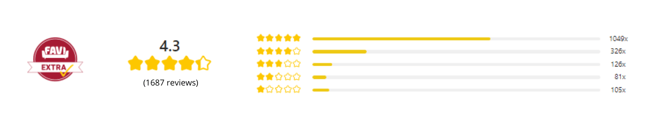
We collect reviews on both the products and the stores themselves.
The number of stars for products is displayed on the main page and the product reviews themselves can be seen by clicking on the details. We display both verbal and visual reviews. It is also possible to see who wrote the review, the date it was created and the name of the store through which the customer placed the order with a link to the landing page of that store on FAVI.
All reviews are approved before publication. We do not approve reviews that:
- contain a verbal evaluation of the store's services instead of a specific product,
- contain profanity, grammatical errors that make it impossible to read or are irrelevant,
- contain personal information - for example: phone number, address or email,
- indicate that the product has not yet arrived,
- are likely to be fake or written by the shop/partner.
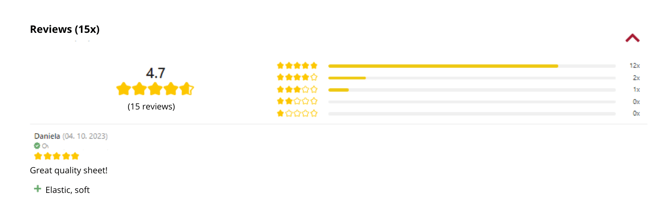
For store reviews, we only display the visual side without a verbal rating.
Export of reviews
On the partner dashboard in the FAVI Extra tab, you have the option to export a detailed list of product reviews into a CSV file. This file can be easily transformed into an Excel sheet by selecting File > Empty sheet > Data > Z Text/CSV > "click on the downloaded file" > import.
The table displays information about the product reviews, such as both numerical and textual evaluations, if provided. If the review was not provided by an anonymous source, you will also find the transaction number, listed as "Order ID", within the table.
Frequently Asked Questions
Is this a paid service?
No, the service is and will be free. Its implementation does not even increase the price per click.
...
When does the customer receive the review request email?
We automatically send the review request email one week after the expected delivery date of the order. The delivery date is based on the product availability specified in the XML feed at the time of purchase.
If the order contains products with different availability, we send the email according to the product with the longest availability.
If a product does not have a availability specified in the XML feed, or if the product is out of stock, we send the email 18 days after the order is created.
...
Where will the reviews be displayed?
Specific product reviews will be displayed on the product detail page. On the product listing in the category, you will see that the product has already been awarded by a review.
...
Is it possible to filter/sort rated products in the catalog?
Yes, products from stores that have the EXTRA SHOP service in place can already be filtered and sorted from the best rated. So it is much easier for the customer to find products that are already rated.
...
I already collect reviews through other sites, why should I collect reviews through FAVI?
Within the FAVI EXTRA service, product reviews are particularly important, which will later play a role in the search, sorting but also, for example, additional promotion, and because FAVI is directly focused on furniture and home decoration, we believe that it makes sense to collect reviews through FAVI for this segment and improve the customer experience in the process of choosing furniture and decoration.
...
Will FAVI be sending out a review request on all products in our range?
We only pair and send review requests for products that the client has listed on FAVI. Therefore, if you sell other products that are not listed on FAVI, requests will not be sent for those products.
...
What are the conditions for processing the personal data of my customers that I provide to FAVI for the purpose of sending out review requests?
The processing of personal data will only be for the purpose of providing a consumer satisfaction survey and therefore the data collected will not be used for other purposes. Within the form for completing the review, there will be a reference to the processing of personal data in connection with reviews, but also, for example, the possibility to opt-out of the questionnaire, in which case we will never send the request to such a customer again. Customers who do not respond to the review request will have their data completely deleted after 3 months.